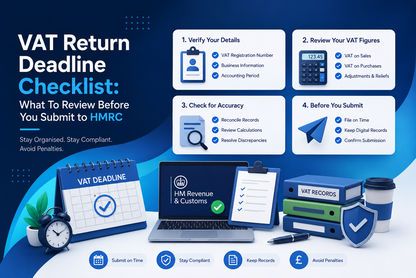
A practical pre-submission checklist for UK VAT-registered businesses, sole traders, landlords with VAT obligations and bookkeepers who want a calmer, more accurate and MTD-friendly VAT filing process.
VAT Returns are routine, but routine tasks are exactly where mistakes creep in. A missed deadline, a copied number in the wrong box or an unreconciled purchase ledger can create unnecessary HMRC stress.
A short pre-submission checklist can help small businesses file with more confidence, reduce avoidable errors and lower the risk of late submission penalty points or late payment costs.
Who This VAT Return Checklist Is For
This guide is designed for VAT-registered UK small businesses, sole traders, limited companies, landlords with VAT obligations, agents, accountants and bookkeepers who want a practical review process before submitting a VAT Return to HMRC.
Step 1: Confirm the Correct VAT Period
Before reviewing any numbers, check the VAT obligation period. This matters because a correct calculation for the wrong quarter is still a filing problem.
Your VAT online account or Making Tax Digital software should show the open period and due date. Do not assume the quarter based only on your internal spreadsheet name.
Step 2: Check VAT Return Boxes 1 to 9 Against Your Records
VAT Returns use specific boxes, and each box has a defined purpose. A practical review should compare sales totals, purchase totals, VAT due, VAT reclaimed and the final net position before submission.
| VAT Return area | What to check before submission |
|---|---|
| Output VAT | Check VAT charged on sales, credit notes and any reverse charge treatment. |
| Input VAT | Check VAT reclaimed on purchases, supplier invoices and blocked or restricted input tax. |
| Net VAT position | Confirm whether VAT is payable to HMRC or repayable to the business. |
| Sales and purchases | Reconcile VAT Return totals to the source records for the period. |
Step 3: Review Adjustments and Unusual VAT Items
Every VAT period has a few transactions that deserve a second look. These may include credit notes, domestic reverse charge entries, bad debt relief, partial exemption adjustments, flat rate scheme calculations, imports, exports or unusual one-off purchases.
Step 4: Make Sure the VAT Payment Will Reach HMRC On Time
Submission and payment are related but separate tasks. HMRC can receive a VAT Return but still treat the payment as late if the money does not arrive by the due date.
Step 5: Understand VAT Penalty Points
For VAT accounting periods starting on or after 1 January 2023, late submission penalties work on a points-based system. Each late VAT Return can add a penalty point until the business reaches the threshold for its submission frequency.
| VAT Return frequency | Penalty point threshold | What happens at the threshold? |
|---|---|---|
| Annual returns | 2 points | HMRC can charge a £200 penalty. |
| Quarterly returns | 4 points | HMRC can charge a £200 penalty. |
| Monthly returns | 5 points | HMRC can charge a £200 penalty. |
HMRC can also charge further £200 penalties for subsequent late submissions while the business remains at the threshold. The rules can apply even where the return is nil or repayment-only.
Step 6: Keep the Filing Receipt and Supporting Records
Once the return is submitted, save the HMRC receipt, the VAT summary and the exact records used to prepare the return. This is good housekeeping and can be very helpful if questions arise later.
- The final spreadsheet version used for the VAT Return.
- Sales export and purchase export for the VAT period.
- Adjustment notes and explanations for unusual items.
- VAT summary showing boxes 1 to 9.
- HMRC submission confirmation or receipt.
- Payment confirmation or bank reference.
- Evidence that digital records were retained correctly.
MTD-Friendly VAT Records: What Spreadsheet Users Should Check
Under Making Tax Digital for VAT, businesses within the rules should keep digital records and use compatible software or bridging software to submit VAT Returns to HMRC.
- Check that source records have not been manually overwritten without explanation.
- Keep spreadsheet versions clearly named by VAT period.
- Use formulas consistently and protect key calculation cells where possible.
- Keep adjustment notes with the VAT period file.
- Use HMRC-recognised software or bridging software for submission.
Quick VAT Return Pre-Submission Checklist
- Correct VAT period and due date confirmed.
- Boxes 1 to 9 reviewed against source records.
- Sales and purchase totals reconciled.
- Manual adjustments explained and saved.
- Reverse charge, imports, exports and unusual items reviewed.
- Payment method and bank processing time checked.
- Submission receipt saved after filing.
- Digital records retained for future reference.
Common VAT Return Mistakes to Avoid
- Submitting for the wrong VAT period.
- Forgetting that payment must also reach HMRC by the due date.
- Using spreadsheet totals without checking formulas or filters.
- Missing credit notes or late supplier invoices.
- Not keeping evidence for manual VAT adjustments.
- Assuming a nil VAT Return cannot create a penalty risk.
How 11 MTD Bridge Can Help
11 MTD Bridge helps small businesses and agents make the VAT filing step clearer. Users can upload spreadsheet data, review a box-by-box VAT summary, submit through HMRC-recognised software and keep confirmation records.
Quick Answers Before You Submit to HMRC
Simple answers to the most common VAT Return deadline, penalty and MTD record questions.
When is a VAT Return usually due?
A VAT Return is usually due one calendar month and 7 days after the end of the VAT accounting period. This is usually also the deadline for paying HMRC.
What should I check before submitting a VAT Return?
Check the VAT period, boxes 1 to 9, sales and purchase totals, manual adjustments, payment timing, digital records and the final submission receipt.
Can HMRC charge a penalty for a nil VAT Return?
Yes. Late submission penalty points can apply even if your VAT Return is nil or repayment-only.
How do VAT penalty points work?
Each late VAT Return can add a penalty point. When the threshold is reached, HMRC can charge a £200 penalty.
Does MTD affect VAT Return records?
Yes. Businesses within Making Tax Digital rules should keep digital records and use compatible software or bridging software to submit VAT Returns.
What records should I save after filing?
Save your VAT summary, source records, adjustment notes, HMRC submission receipt and payment confirmation.
Helpful 11 MTD Bridge Guides
- File VAT Return Online as an Individual
- VAT Filing for Agents and Accountants
- HMRC Business Tax Account Guide
- MTD Bridging Software for UK VAT Returns
Make Your VAT Filing Process Calmer
Use 11 MTD Bridge to review spreadsheet VAT figures and submit through an HMRC-recognised digital workflow.
Explore 11 MTD BridgeOfficial Sources
- GOV.UK: Sending a VAT Return
- GOV.UK: Penalty points and penalties if you submit your VAT Return late
- GOV.UK: How late payment penalties work if you pay VAT late
- GOV.UK: Late payment interest if you do not pay VAT or penalties on time
This guide is for general information only and should not be treated as tax advice. VAT rules, penalties and HMRC guidance can change. Always check current GOV.UK guidance or speak to a qualified accountant or tax adviser for your specific circumstances.
Last updated: 7 July 2026 | Reviewed by: 11 MTD Bridge Tax Content Team
Ready to File with 11 MTD Bridge?
Keep your Excel workflow and file with a UK-focused, spreadsheet-friendly MTD solution.
Start Filing with 11 MTD Bridge